Friday, February 10, 2017

Performance: Use Persistent Connections

Small Changes First

The first few points of this series are going to be around moderately small changes for the greatest gain.

It's easy to recommend the complete overhaul and re-engineering of a system using all the latest and greatest technologies and platforms available, but for many organisations, especially if you're having to maintain and slowly migrate a monolith to something more granular, that kind of change takes many months (and longer) to achieve once you factor in costs (both in time and dollars), training, testing, competing business priorities, etc...

As I run out of quick wins, I'll get into more architectural changes because they're pretty much inevitable as a system grows.

Be Persistent

If a single process is making multiple network calls to the same service, it makes sense that maintaining a persistent connection instead of creating a new connection for each individual call will lead to a performance gain; it reduces the number of connect() syscalls, the number of TLS handshakes and any sort of authentication/authorisation that happens once a connection is established.

See:

The question then becomes: can the endpoint you're connecting to (if you control it) handle the number of persistent connections you'll have open in the worst case?

Monday, January 30, 2017

Performance: Profile Your Damn Code First

I started jotting down notes for this post without much of an idea of how I was going to present them; I was just working on a bunch of performance issues and investigating potential future improvements and noticed a number of recurring ideas across different systems, and I thought they were worth sharing with the world.

Originally I wanted to post all of these ideas in one large post, but with the number of things to discuss, it felt like I was never gonna get the damn thing finished, so I decided to split it up instead.

This isn't for the developer who is already well-seasoned in tackling performance issues; it's for the developer who may need to do it soon, but doesn't know exactly where to start.

Although the points in this series will be on the Perl-ish side, the ideas should easily transfer.

Latency

Mostly what I'm going to be talking about in this series relates to latency.

With the various infrastructure providers around today, if a system is running slow, it's pretty easy to add more machines to the mix to pick up the slack. But all you've done is increased the capacity of the system. The latency - the time it takes to serve a single request - still sucks, no matter how many more machines you add.

Until you address the latency issues, you won't be utilising all of the resources of the individual machines you're paying for and your cost-to-serve (which your CFO cares about) will be unnecessarily high. That's bad.

Stretching the hardware and infrastructure you've already got by managing and minimising latency lowers cost-to-serve and increases capacity and throughput.

Use a Profiler

I feel like this goes without saying, but evidently, I've found that having a vested interest in this kind of work makes me the exception to the rule, so: profile your code first. If you have a slow application, there's no point guessing which bit is the slow bit.

In the past, I've seen slow page-load times and memory spikes, and everyone was sure what the cause was going to be, only to hook up NYTProf and quickly see from the flame graph that a Class::DBI relationship inflating timestamps into DateTime objects was the cause.

Don't guess! Profile the damn thing!

Friday, December 23, 2016

Grip

When I first started strength training, I didn't own a pair of straps, so I did all of my pulling work (deadlifts, rows, pull-ups, etc) without straps. Because of this, I never had grip problems. So when I started using my straps a lot more often a couple of years ago, very slowly my grip strength started to suffer, and I barely noticed it was happening.

Fast-forward to the start of this year and any moderately heavy farmer's walk was held back by my grip (my solution was to put my straps on and continue, making the problem worse) and the top sets of all my deadlift days were getting cut short because my left hand would start to open up after a few reps (and my solution, again, was to put straps on and continue, making the problem worse).

The solution was pretty clear; stop using straps in training.

It's been a slow and humbling process and it's taken a while, but finally my deadlift sets are being held back by other issues now and I can comfortably farmer's walk with competition weights without worrying about my hands opening up for the last few steps.

Friday, November 18, 2016

Mastering Go

Earlier this year I blogged briefly about learning Go. Having gotten very comfortable with the language, I've written a bunch of small programs and we've deployed some fairly critical code to production at work, and I'm looking at rewriting another production system in Go, so I'm on the path to mastery now.

Having implemented the same concurrency patterns in both Perl and Go, I'm very happy with the power that Go's channels and goroutines provide; it makes concurrent systems much quicker to get up and running and I spend very little time testing and worrying about read/write buffers and blocking/nonblocking calls.

The next step will be getting into the wide world of third-party libraries that other people have written to look for defacto standard modules (like what DBI is to Perl).

All in all, a fun ride so far.

Friday, September 9, 2016

Return Promises, not Condition Variables

Eventually it'll happen; you'll be writing a library that's responsible for making a bunch of network calls, and because you've worked in IO-heavy applications before, you've already been sold on asynchronous programming patterns and because you've hated having to turn away so many modules on CPAN that do the exact job you want because they completely ignore the needs of the asynchronous crowd, you're going to write your library (or a version of the library) so that it can integrate easily with an event-loop framework by providing an asynchronous API.

One of the biggest rookie mistakes I made in the beginning, was writing functions that return AnyEvent::CondVar objects. It can work just fine if your entire application uses and expects other condition variables and you only need a small handful of them, but when the application grows and you perhaps start integrating with libraries whose functions return Promises or Futures, condition variables only get in the way. And when you start calling many functions that all return condition variables, you wind up in an ugly spaghetti of callbacks.

Return promises or futures and, in your application code, utilise the chaining/sequencing/pipelining features so it doesn't look like spaghetti. You'll end up with cleaner-looking code that's more easily maintainable, reads like synchronous code, and is easier for other developers to dive into.

Friday, August 5, 2016

Writing an Asynchronous Echo Server

Echo servers are basically the "Hello, World!" of network programming, so I'm going to step through building an asynchronous echo server using AnyEvent, although any bare-bones event loop, like EV, could be used.

This is less to do with building an echo server and more about thinking asynchronously and what complications arise from writing asynchronous code from the ground up. Asynchronous solutions in IO-heavy applications will result in much better performance than if you, for example, went with a forking model.

The forking model is often very tempting as it has a much lower barrier to entry, but is also very memory hungry as each forked process ends up with a copy of the parent processes' memory. The other problem with the forking model in an IO-heavy application, is that when disk and/or network IO is the bottleneck, adding more processes, which will only attempt more IO operations, is more likely to compound the problem rather than fix it, so it's often the wrong tool for the job, despite many people using it as such.

Knowing when your code is IO-bound is something most likely discovered with some kind of profiling tool. In the Perl world, Devel::NYTProf is the defacto standard weapon of choice for profiling and I can't count the number of times it's helped me out with identifying performance bottlenecks.

Before I get into any code, I just want to mention that all of what I'm about to discuss could be managed by AnyEvent::Handle (or your favourite event loop framework's equivalent), but, as a learning exercise, I'm doing it the hard way, to appreciate what AnyEvent::Handle abstracts away for us. The take-home message should be: use AnyEvent::Handle. If you don't use it, hopefully this will give you a taste of what you're in for.

Gotta Start Somewhere

Let's start with a pretty basic implementation of a non-blocking echo server.


#!/usr/bin/env perl

use warnings;
use strict;

use AnyEvent;
use IO::Socket;
use Socket qw/SOMAXCONN/;
use POSIX qw/EAGAIN EWOULDBLOCK EPIPE/;

use constant {
  SYSREAD_MAX => 8192,
};

my $listen = IO::Socket::INET->new(
  Listen    => SOMAXCONN,
  LocalAddr => 'localhost',
  LocalPort => 5000,
  ReuseAddr => 1,
  Blocking  => 0
) or die $!;

print "Listening on port 5000...\n";

my %clients;

my $w = AnyEvent->io(
  fh   => $listen,
  poll => 'r',
  cb   => sub {
    my $client = $listen->accept;
    $client->blocking(0);

    printf "Client connection from %s\n", $client->peerhost;

    $clients{$client}->{r} = AnyEvent->io(
      fh   => $client,
      poll => 'r',
      cb   => sub { read_data($client) }
    );
  }
);

AE::cv->recv;

sub read_data {
  my ($client) = @_;

  my $bytes = sysread $client, my $buf, SYSREAD_MAX;

  if ( not defined $bytes ) {
    if ( ( $! == EAGAIN ) or ( $! == EWOULDBLOCK ) ) {
      return;
    }
  }
  elsif ( $bytes == 0 ) {
    disconnect($client);
    return;
  }

  chomp( my $chomped = $buf );
  printf "Read %d bytes from %s: %s\n", $bytes, $client->peerhost, $chomped;

  my $w; $w = AnyEvent->io(
    fh   => $client,
    poll => 'w',
    cb   => sub {
      write_data( $client, $buf );
      undef $w;
    }
  );
}

sub write_data {
  my ( $client, $buf ) = @_;

  my $bytes = syswrite $client, $buf, length($buf);

  if ( not defined $bytes ) {
    if ( ( $! == EAGAIN ) or ( $! == EWOULDBLOCK ) ) {
      return;
    }
    elsif ( $! == EPIPE ) {
      disconnect($client);
      return;
    }
  }
  else {
    printf "Wrote %d bytes to client %s\n", $bytes, $client->peerhost;
  }
}

sub disconnect {
  my ($client) = @_;

  printf "Client %s disconnected\n", $client->peerhost;
  delete $clients{$client};
  $client->close;
}

The big issues are:

  1. The read_data() function, after reading data from the client, will blindly create more and more watchers to write data back to the client. These watchers aren't guaranteed to be run in the order they were spawned, which means we run the risk of writing data in the wrong order. The number of watchers we create will be non-deterministic, which means memory usage may also go up. In the same way that we only have one read watcher, it'd be great to only have one write watcher.
  2. The write_data() function presumes that because we asked syswrite() to write X bytes to the socket, that X bytes were actually written. Because this is a non-blocking socket, we're not guaranteed that to be the case, and if we end up in this situation, and there are many scheduled write_data() events to happen, we need to finish sending what's left of the current buffer first, otherwise we risk writing data in the wrong order.

Another big issue, which isn't the case for an echo server, but would be in the case of, for example, a HTTP server, is that the read_data() function will sysread() some data, presume it's read the entire input and then act on that input. At the moment the code reads, at most, 8192 bytes of data from the client, but a full HTTP request (e.g. a file upload) may easily exceed that.

Buffers

A way to solve these issues is with read and write buffers and one watcher to act on each buffer, so that, at most, each client connection results in two watchers being created, one to act on the read buffer, and one to act on the write buffer.


#!/usr/bin/env perl

use warnings;
use strict;

use AnyEvent;
use IO::Socket;
use Socket qw/SOMAXCONN/;
use POSIX qw/EAGAIN EWOULDBLOCK EPIPE/;

use constant {
  SYSREAD_MAX  => 8192,
  SYSWRITE_MAX => 8192,
};

my $listen = IO::Socket::INET->new(
  Listen    => SOMAXCONN,
  LocalAddr => 'localhost',
  LocalPort => 5000,
  ReuseAddr => 1,
  Blocking  => 0
) or die $!;

print "Listening on port 5000...\n";

my %clients;

my $w = AnyEvent->io(
  fh   => $listen,
  poll => 'r',
  cb   => sub {
    my $client = $listen->accept;
    $client->blocking(0);

    printf "Client connection from %s\n", $client->peerhost;

    # Each connection gets a read buffer, a write buffer, and read/write
    # watchers.
    $clients{$client}->{rbuf} = '';
    $clients{$client}->{r}    = AnyEvent->io(
      fh   => $client,
      poll => 'r',
      cb   => sub { read_data($client) }
    );

    $clients{$client}->{wbuf} = '';
    $clients{$client}->{w}    = AnyEvent->io(
      fh   => $client,
      poll => 'w',
      cb   => sub { write_data($client) }
    );
  }
);

AE::cv->recv;

What's changed is that each client socket gets exactly one read watcher, one write watcher and read and write buffers. Otherwise, everything's the same.


sub read_data {
  my ($client) = @_;

  # Read data from the client and append it to the read buffer
  my $bytes = sysread $client, $clients{$client}->{rbuf}, SYSREAD_MAX,
    length( $clients{$client}->{rbuf} );

  if ( not defined $bytes ) {
    if ( ( $! == EAGAIN ) or ( $! == EWOULDBLOCK ) ) {
      return;
    }
  }
  elsif ( $bytes == 0 ) {
    disconnect($client);
    return;
  }

  printf "Read %d bytes from %s. Read buffer: %s\n", $bytes,
    $client->peerhost, $clients{$client}->{rbuf};

  while ( ( my $i = index( $clients{$client}->{rbuf}, "\n" ) ) >= 0 ) {
    my $msg = substr( $clients{$client}->{rbuf}, 0, $i + 1, '' );
    push_write( $client, $msg );
  }
}

The main changes here are that we sysread right onto the end of the read buffer, and then we process what's in the read buffer. For an echo server, we presume that one "message" is any data that has been terminated by a newline character. So when we have received a full message, we queue it to be sent back to the client with the push_write function.


sub push_write {
  my ( $client, $msg ) = @_;

  $clients{$client}->{wbuf} .= $msg;
}

All this does is append to the write buffer. There is already a write watcher associated with this client socket, which will consume the write buffer when it's scheduled to run by the event loop.


sub write_data {
  my ($client) = @_;

  # Nothing in the write buffer?
  return unless $clients{$client}->{wbuf};

  my $bytes = syswrite $client, $clients{$client}->{wbuf}, SYSWRITE_MAX;

  if ( not defined $bytes ) {
    if ( ( $! == EAGAIN ) or ( $! == EWOULDBLOCK ) ) {
      return;
    }
    elsif ( $! == EPIPE ) {
      disconnect($client);
      return;
    }
  }
  else {
    # $bytes were successfully sent to the client, so we can remove it from
    # the write buffer.
    substr( $clients{$client}->{wbuf}, 0, $bytes ) = '';
    printf "Wrote %d bytes to client %s\n", $bytes, $client->peerhost;
  }
}

All this code does is attempt to write the contents of the write buffer to the client socket. When a chunk of data has been written successfully to the socket, the write buffer is trimmed of that data.


sub disconnect {
  my ($client) = @_;

  printf "Client %s disconnected\n", $client->peerhost;
  delete $clients{$client};
  $client->close;
}

And this function hasn't changed at all.

That works pretty damn well and we've kept the memory usage per connection as consistent as possible.

More Issues to Consider

We've got the basics down, but there's more (there's always more).

Lingering

All we've dealt with here is an asynchronous echo server. Asynchronous client code has its own issues.

In the code above, a call to push_write() simply appends data to the write buffer, but that doesn't mean that it's been successfully written to the socket yet. So, if in a client application, we wanted to now disconnect from the server after a bunch of calls to push_write, we don't want to close the connection to the server until the write buffer has been completely flushed. One solution to this is to introduce lingering, as it's called in the TCP world (see the SO_LINGER socket option).

Lingering in this case means that, for a number of seconds, the connection will hang around attempting to flush the write buffer before closing the connection. It's a simple idea that adds more complexity to our code.

Buffer Sizes

Another potential issue, when on a very slow network for example, is that the buffer sizes may grow out of control, so they may need to be capped.

TLS, Corking, Delays and More

The list goes on...

There are many socket options and behaviours that you may want to utilise depending on the nature of your application, so support for these options would need to be included.

Factoring Everything Out

The thing that's clear from the code above is that most of it is handling generic asynchronous programming issues, and only a tiny amount of it is actually specific to the functionality of an echo server.

The first time I used AnyEvent::Handle, I didn't understand why it was designed the way it was, but when the time came to implement many of these features in a proprietary event loop framework where I couldn't use AnyEvent, I soon realised I was reinventing the wheel and was finally able to appreciate AnyEvent::Handle's design.

Just for reference, here's what the echo server looks like when written with AnyEvent::Socket and AnyEvent::Handle.


#!/usr/bin/env perl

use warnings;
use strict;

use AnyEvent;
use AnyEvent::Socket;
use AnyEvent::Handle;

print "Listening on port 5000...\n";

tcp_server undef, 5000, sub {
  my ( $fh, $host, $port ) = @_;

  printf "Client connection from %s\n", $host;

  my $hdl;
  my $disconnect_f = sub {
    printf "Client %s disconnected\n", $host;
    $hdl->destroy;
  };

  $hdl = AnyEvent::Handle->new(
    fh       => $fh,
    on_eof   => $disconnect_f,
    on_error => $disconnect_f,
    on_read  => sub {
      $hdl->push_read( line => sub {
        my ( $hdl, $line ) = @_;
        printf "Read from %s: %s\n", $host, $line;
        $hdl->push_write("$line\n");
      } );
    }
  );
};

AE::cv->recv;

So, like most things, I guess the takeaway here is: don't reinvent the wheel if you don't have to, and if you do, learn from those who came before you.

Friday, July 22, 2016

Spit Roasting a Lamb for Greek Easter

This post is a couple of months late, but I wanted to post it anyway.

Greek Easter (Orthodox Easter) has always been one of my favorite times of the year. Not because I'm religious in any particular way, but just because it's a very laid-back occasion with a lot of really good food.

It's the only time of the year when having a spit roasted lamb (or occasionally goat) is guaranteed. And this year, because I've helped out a few friends with their spit roasted meats in the past, I really wanted to help my dad out with the lamb.

On the Saturday morning, dad picked up the lamb from the butcher. He seasoned the inside of the lamb with salt, pepper, oregano and rosemary and he then threaded some garlic cloves and two halves of a lemon onto a string and attached it to the inside of the lamb, so that it wouldn't fall out while the lamb rotated. He sewed up the lamb to keep everything inside and he let the lamb rest overnight on a table in the living room so that it was at room temperature for the next day's cooking.

Early on Sunday morning, I was at my mum and dad's house, and the weather wasn't looking good, so because we didn't want to put the spit up on the deck - taking up precious seating space for the 30 or so people who were coming for lunch - we took the spit out back and rigged up a tarp to keep the lamb sheltered from the rain.

Even with the cold weather, it didn't take long to get a few heat beads going, which we were using as a starter for the charcoal. As soon as it was hot enough, the lamb went on. The heat is concentrated more so on the shoulders and the legs, since there's more meat there and less on the loin.

The next step was getting the basting mix going. It's a very simple recipe: olive oil, lemon, salt, pepper and oregano. I'm pretty sure you could season any meat with that combo and it wouldn't be a wrong decision. The important part though, is that the basting brush must be made from a few branches of rosemary tied onto a stick with some wire. This is key!

Things that must be done throughout the day while the lamb cooks:

  • The lamb must be basted constantly, especially if it doesn't need it.
  • Loose bits of meat and skin must be picked off and eaten as they peel away from the bone.
  • Ouzo, retsina and/or Greek beer are the only drinks allowed around the lamb.
  • A couple of photos must be taken while basting the lamb.

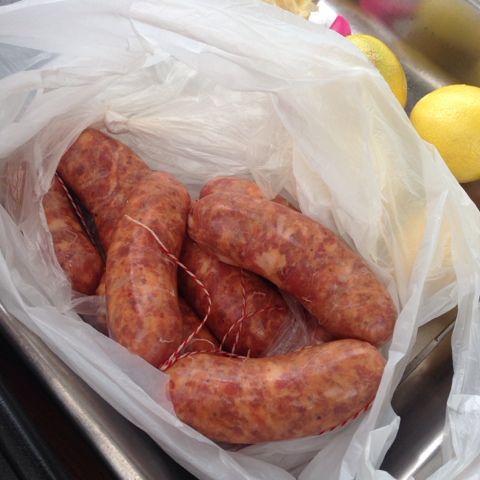
The lamb takes a few hours to cook, and sitting around watching meat cook slowly for several hours is hard work, so dad got out some spicy pork sausages he'd bought from a Greek butcher, sandwiched them in a grill basket and cooked them over the charcoal.

After a few more drinks, and a little more meze, once the lamb finished cooking, it was time to bring it in and carve it up for lunch.

And then it was time to eat! Although the meat was the champion of the day, there was still a ton of food that had been prepared by everyone, including seafood, rice, pasta, vegetables, salads, breads, dips and much more. The sense of community is always alive.

Spit roasting meat is as much about the journey as it is about the destination. The way the meat is prepared, seasoned and basted is unique in each circle, which results in different tastes, and in the same way that watching a campfire burn is incredibly mesmerising, so is watching a lamb cook.

The spectacle of the thing is a great way to get people together, and there's rarely a person who doesn't want to come outside to see the meat cook. The spit also doubles as a heat source when winter has decided to rear its head early ;)

Friday, June 17, 2016

Volume

Borrowing something Paul Carter has written about a lot; to get bigger and stronger, there are three variables that can be tweaked (volume, frequency and intensity), and in order to recover properly, it's realistic to only push two of these really hard at the same time. Since I always train at a fairly high intensity, and I'm not going to be training 6 times a week any time soon, volume is the only variable I can realistically increase in the short term.

Very late last year, I made a conscious effort to increase my total training volume, and I did that with a couple of small changes.

For me, the easiest and least systemically stressful way to increase volume is by increasing my accessory work. But I hate programming accessory work; I hate deciding what sets and reps and weights I'm going to use for my DB rows, DB incline bench or leg press. So instead of prescribing certain sets, reps and weights, I just shoot for a total number of reps, in the 50-100 range (erring on the higher side), and I can hit that number of reps any way I want.

The beauty of just prescribing the total number of reps is that it's self-regulating. If I'm feeling beat up I may just want to hit 4-5 sets of 15-20 with a stupid light weight, or if I'm feeling really great I'll work up to some heavy sets of 8 (maybe a PR set, if it makes sense for the exercise) before backing off to a lighter weight to finish off the 100 reps, or if I'm just feeling lazy I'll use a moderate weight for as many sets of 6-12 reps as it takes to get to 100.

It hurts and it's boring, but it works.

This method also forces me to choose a couple of high bang-for-buck accessories, because if I program 6 different assistance movements, I'll probably burn out trying to hit 100 reps of each, although a fun variation is to split up the 100 reps into a few variations of a lift, e.g. DB flat bench, DB incline press and DB shoulder press.

A smaller change I made was to add in back-off sets to the main movements. Adding in one fairly light (60-70%) rep-out set or a rest-pause set was a small enough change to have a positive effect without taxing myself too much. It also results in a ridiculous pump, especially when deadlifting.

Eventually, however, it's going to get hard to add more volume to individual training days without turning them into 2+ hour marathons, so I'm going to have to bite the bullet, tweak that frequency variable and train more often. To plan for that, I'm stealing a idea from a T-Nation megathread on Westside Conjugate training: extra workouts.

The extra workouts don't have to be done in the gym, and can be done at home with minimal equipment. It's not hard to throw in 100 triceps pushdowns with a resistance band thrown over a door once a week. It can be done in 5 minutes. Over time I can slowly throw in pull ups, band pull-aparts and some light dumbbell shoulder work and it can all be done in 20 minutes. After that, I can slowly build up a second extra workout, and then a third, etc...

Friday, May 13, 2016

Perl/XS Hello World

The number one thing in Perl I've always found confusing is writing an XS extension. I don't write them very often, but when I do, I completely forget how to get started and I end up copying and pasting something I wrote for a previous project, and then I've got a bunch of extra files that I'm not sure I need, and if it turns out that I do need them, I'm not even sure what they're for. So I'm writing this as much as a future reference for myself and as something to help others.

For a bare-bones "hello world" XS extension, we'll need four files:

  • HelloWorld.xs (contains the XS code)
  • lib/HelloWorld.pm (the package, which ends up being the glue between the driver script and the XS code)
  • Makefile.PL (to build the module)
  • bin/driver.pl (a test driver script)

An older method for generating these files (and more) was to use the h2xs utility. I prefer to not use h2xs if possible, purely because it generates a lot more cruft than we need at the moment and also because doing it without h2xs means we know precisely what files we're creating and, more importantly, why. Having said that, later on, testing the various h2xs options can help solve problems in our XS stuff, if we get stuck and can't find any documentation for our problem.

HelloWorld.xs will contain one function (referred to as an XSUB) that simply prints some text to stdout.


#include "EXTERN.h"
#include "perl.h"
#include "XSUB.h"

#include <stdio.h>

MODULE = HelloWorld    PACKAGE = HelloWorld::handle

void
hello()
  CODE:
    printf("Hello, world!\n");

In this simple example, we're exposing one XSUB, hello(), to the Perl world, which will be available via the HelloWorld::handle package.

The resulting C code can be generated by running xsubpp over the file. Running xsubpp will generate a ton of code that won't make sense, but it can be interesting to see just how much code is generated for such a simple module.

Looking at the code, it looks like C with some extra stuff tacked on. That extra stuff is the XS stuff. Any code that precedes the MODULE directive is purely C code. In this top section, we can write whatever C functions we want, and they can be referenced below in the "XS stuff". It's important to realise that any C functions you write at the top of the file are not automatically exposed as XSUBs. To do that, you'd have to write a corresponding XSUB further down (and there's some nice shorthand for that).

A common question at this point is "what's the difference between MODULE and PACKAGE?" A MODULE is a way to group multiple XS extensions together under different PACKAGE names. For example, we may write a ton of HTTP XS libraries under the MODULE HTTP::XS but split up code into a PACKAGE named HTTP::XS::HTTP1_0 and another named HTTP::XS::HTTP1_1 and some other packages to deal with TLS, proxies, authentication, etc...

The name of your Perl package doesn't need to be the same as the name of your XS module either, so, if we really wanted to, we could have the Perl package FooBar, in lib/FooBar.pm, load the HelloWorld.xs extension.

Moving on, now HelloWorld.pm needs to tell Perl how to load the extension.


package HelloWorld;

use warnings;
use strict;

our $VERSION = '0.01';

require XSLoader;
XSLoader::load('HelloWorld');

sub say_hello {
  my ($self) = @_;
  HelloWorld::handle::hello();
}

1;

As per the XSLoader docs, XSLoader is a simplified version of DynaLoader. Use XSLoader. XSLoader works well.

The say_hello() function wraps the hello() XSUB from our XS module. The benefit of adding this extra layer (as opposed to having the client code directly call our XSUB), is so the module developer (us) can add something extra (like checking argument values/types with a type system like Type::Tiny) without changing the interface to the XS extension and without adding any unnecessary complexity to the XSUB.

The next step is to build the extension. We use Makefile.PL for this (or Build.PL if you prefer Module::Build).


use 5.008009;
use ExtUtils::MakeMaker;

WriteMakefile(
  NAME         => "HelloWorld",
  VERSION_FROM => "lib/HelloWorld.pm",
);

There's nothing magical going on; it's a pretty stock-standard Makefile.PL. If we wanted to reference any external libraries or if we wanted to use g++, llvm or clang to build our extension, the docs give a few hints how to do that.

We now have enough pieces in place to build the module.


$ perl Makefile.PL
Generating a Unix-style Makefile
Writing Makefile for HelloWorld
Writing MYMETA.yml and MYMETA.json
$ make
cp lib/HelloWorld.pm blib/lib/HelloWorld.pm

 ... removed for brevity ...

At this point a ton of extra files have been generated, in particular the blib directory. This is the "build library" directory and it's the staging area for everything that is to be tested and, finally, installed onto the machine.

Since we don't want to install the module yet, and we just want the driver script to use what's in the blib directory, the driver scripts needs to make sure it retrieves its definition of the HelloWorld package from this directory and not a version that may already be pre-installed on the machine...


#!/usr/bin/env perl

use warnings;
use strict;

use ExtUtils::testlib;
use HelloWorld;

HelloWorld->say_hello();

... and that's what ExtUtils::testlib handles for us, by manipulating @INC to include the blib directory. Once our module is installed, using ExtUtils::testlib would be unnecessary. Apart from that, the driver script is insanely simple.


$ perl bin/driver.pl
Hello, world!

Huzzah!

So what's next? What if I want to write my XSUBs in C++? What if I want to interface with some other C/C++ library? How do I return a list or a hash from my XSUB? How do I pass a list or a hash into my XSUB? That all kinda goes beyond the scope of this post, and I may follow up with another post eventually, but until then here's some useful links:

  1. XS Fun. Sawyer X's XS tutorial. I actually found this after I'd pretty much finished writing this blog post. Definitely the most useful resource to read next before really getting into the perldocs.
  2. perlxs. Includes documentation on all of the XS keywords.
  3. perlguts. The section on variables is very useful.
  4. perlapi. The Perl API. Contains a bunch of functions and macros.

Friday, April 15, 2016

Baked Chicken Drumsticks

Last weekend, I was trying to use up the last of the food in the fridge before it had to be thrown out, and I found a pack of chicken drumsticks that we'd bought super cheap earlier in the week. I wanted something warm and toasty since the weather has been getting cold again.

I put the chicken in a baking dish, seasoned it with salt and smoked paprika, roughly chopped up an onion and threw it in there with a can of diced tomatoes and some olive oil. It went in the oven at 180C and let it cook for an hour and a half.

When I pulled it out of the oven, I knew I'd done good. When I checked how done the drumsticks were, I picked one up with some tongs and the bone fell out.

Cherie was home a few minutes later, so we heated up some brown rice and lunch was ready! I love that kind of simple cooking!

Thursday, March 24, 2016

Go

In the very small amount of spare time that I have at the moment, I'm learning to program in Go, with a short-term goal to write some performance testing utilities for work and a long-term goal to make it my second go-to language after Perl.

The reasons I've chosen Go are pretty simple:

  1. Healthy ecosystem. There are tons of libraries, lots of articles, plenty of discussion and frequent updates to the compiler.
  2. Simple concurrency primitives. A lot of the problems I'm dealing with at the moment need to be approached with concurrency in mind. Goroutines and channels fit a lot of these problems really well.
  3. Statically linked executables. This is really nice to have. It means when I write performance testing utilities for work, they are easily deployed and run on all kinds of machines, whether they're for one product or another or whether it's a production or development environment. It means I can avoid any runtime dependency hell if there are subtle environment differences between machines and it means I don't have to change the state of the machine just to run my code.
  4. Composition over inheritance. It's a personal preference, but I hate inheritance once it grows beyond a couple of layers.

Now, just wait a few months and I'll write a blog post titled "what I hate about Go" :)

Friday, February 26, 2016

Handy Skills: More Useful Knots

Last year I briefly wrote about knot tying and that I was learning to be a little less useless when helping people move house by having a few knots up my sleeve. Back then I only learned a couple of really simple knots, like the bowline, the clove hitch and the square knot. I've picked up a few other useful knots for a couple of semi-common situations since then.

  1. Threaded Figure 8. When erecting a tent or a marquee, a threaded figure 8 is useful for attaching your guy ropes to the actual tent or marquee, if they didn't come already-attached. A bowline can be used aswell, but with all of the different variations, I think a figure 8 is more versatile, even if it's a little slower to tie than a bowline.
  2. Trucker's Hitch. Following on from the figure 8, after the guy rope has been attached to the tent, the other end of the rope needs to be attached to the peg in the ground (or a nearby tree), and the trucker's hitch is an awesome way to tension and secure the rope. I like the trucker's hitch more than the taut line hitch for this purpose because I've found that the taut line hitch doesn't work well with every kind of cordage, whereas the trucker's hitch does. It's also great for tying down cargo in the tray of a ute, or in the back of a moving truck. It looks difficult to tie, but it's worth spending time on for how versatile it is. It's one of those knots I watched my dad tie a million times as a kid but was never able to remember how he did it.
  3. Slipped Sheet Bend. Great for joining two bits of rope together. It's a lot stronger than a square knot and is quicker to tie and easier to undo than a figure 8 bend.
  4. Timber/Killick Hitch. For hauling anything and everything. I haven't actually used this in any real situation yet, but I like it.